Skip to content

Xray alternative

Keep Xray and add The Warden, or consider an Xray alternative.

Teams on Xray usually ask one of two things: can we add something above it, or can we replace it? Both are supported, and neither is required. Leave Xray in place and let The Warden decide whether the proof for each build is enough, or move test cases into native Jira testing with TestWarden.

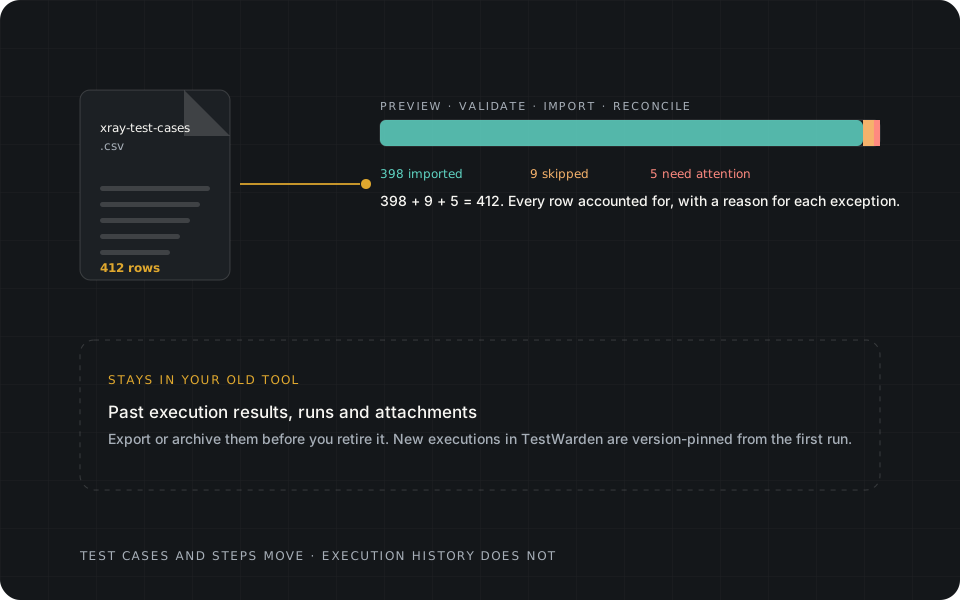
A 412-row CSV reconciled as 398 imported, 9 skipped and 5 needing attention. Past execution results stay in the old tool.

Two adoption paths

Two paths, and what neither one does.

Xray describes itself as Jira-native quality management covering manual and automated testing. TestWarden is a narrower Jira Cloud product with a different centre of gravity: native test management plus an independent verification authority. Choose by the decision you need to make, not by a feature count.

  • Path 1

    Keep Xray and add The Warden

    Your CI keeps running tests and, if you use it, keeps importing results into Xray. Add a step that submits the same complete JUnit XML, or a SARIF report from a scanner, to The Warden over the Forge App REST API. A read-only Xray Cloud collector is in source and still under acceptance. It is not live, and nothing is synchronised. The Warden evaluates the evidence you send for the exact build against a versioned contract.

  • Path 2

    Optionally move to TestWarden

    Import manual test cases from the Xray Test Case Importer CSV, rebuild cycles in Plans & Runs, and run tests, defects and coverage in one Jira app that includes The Warden. Test cases move; execution history does not, so decide what to retain first (see below).

Capability matrix

Xray and TestWarden, side by side.

The Xray column comes from Xray's own Marketplace listing and documentation. Where those pages say nothing, this table says nothing.

Xray per vendor documentation compared with TestWarden
TopicXray, per vendor documentationTestWarden
What it isJira-native test and quality management using native Jira issue types for manual and automated testing.Jira-native test management (shared library, structured steps, cycles, version-pinned attempts, coverage) plus The Warden, an evidence-based verification authority.
HostingListed for Jira Cloud, Server and Data Center.Jira Cloud on Atlassian Forge. TestWarden is publicly listed on Atlassian Marketplace; direct provider connectors remain separately staged.
Automation resultsImport endpoints for Xray JSON, Cucumber JSON, JUnit, NUnit, xUnit, TestNG, Robot Framework and Behave results; REST and GraphQL APIs.Evidence intake for JUnit XML, SARIF 2.1.0 and provider-neutral JSON, tied to repository, commit, build and environment. Submitted results are evidence for a decision, not test-run records. A read-only Xray Cloud collector is in source, not live.
Who decides readinessNot described as a verification authority in the documentation reviewed; teams typically use reports and their own gates.A deterministic policy returns CLEARED, VERIFYING, HELD, NEEDS APPROVAL or INCOMPLETE with fixed reason codes. No external pass can set CLEARED.
Pricing modelPaid through Atlassian Marketplace with Standard and Advanced editions and a free trial, per the Marketplace listing. This page quotes no vendor prices.Free for sites up to 10 Jira users, a 30-day evaluation for larger sites, then user-tiered Standard. See the pricing page.

Product pricing and plan details change; see the pricing page for TestWarden and Xray's own Marketplace listing for theirs. The eight questions that separate tools make a good evaluation checklist.

Switching from Xray

What an Xray CSV migration brings.

The Migration Center reads the Xray Test Case Importer CSV, or a Jira/Xray CSV with the Manual Test Steps JSON field: upload, mapping detection, preview, resumable import and a per-row fidelity report. It migrates test cases.

In XrayIn TestWarden
Test (manual)Test case with structured steps, imported
Summary, description, priority, labelsTitle, description, priority, tags, imported
Test SetNot imported. Recreate as a folder or tag.
Test Plan, Test ExecutionNot imported. Rebuild as cycles in Plans & Runs.
Precondition issueNot imported as a linked object. Precondition text on the test is kept.
Execution results, attachmentsNot migrated by any TestWarden adapter.
  • The Xray adapter is verified against documented Importer-layout fixtures, including a semicolon-delimited layout and a Manual Test Steps JSON export, not every Xray edition or export. Preview your own file first.
  • Unknown columns are kept as custom fields rather than dropped.

What to do with Xray execution history

Historical executions and attachments do not move with the CSV. Retain your Xray site, or export the executions and reports you need for audit, before you retire it, and start clean cycles in TestWarden. If history must stay queryable in Jira, running both side by side through one release cycle is the lower-risk route.

Full details are on the Migration page, in the documentation and in Migrating from the Xray Test Case Importer CSV.

Migration Centerxray-test-cases.csv · 412 rows
  • Move from Xray
    Test Case Importer CSV
  • Move from Zephyr Scale
    Zephyr Scale CSV
  • Generic CSV
    Spreadsheet or AIO Tests export
xray-test-cases.csv412 rows · UTF-8 · limit 10 MB and 10,000 rows per job

Choose. Pick the source: Xray Test Case Importer CSV, Zephyr Scale CSV, or a generic CSV such as an AIO Tests export. Here, a 412-row export.

Illustrative example with a fictional file. Row counts reconcile: 398 + 9 + 5 = 412.
Read this scene as text
  1. Choose. Pick the source: Xray Test Case Importer CSV, Zephyr Scale CSV, or a generic CSV such as an AIO Tests export. Here, a 412-row export.
  2. Map. Source columns map to TestWarden fields. Known layouts are detected; anything unmapped is kept as a custom field, not dropped.
  3. Preview. A dry run validates every row before anything is written: what will import, what will skip, and the reason for each exception.
  4. Import. The import runs in the background in batches with checkpoints. It is resumable and idempotent, so closing the panel loses nothing.
  5. Reconcile. The report accounts for every row. Test cases and their steps are in TestWarden; past execution results stay in your old tool, so export them there before you retire it.

Evaluate it yourself

Questions to put to any Xray alternative

  1. 01Can tests be shared across Jira projects without cloning?
  2. 02What happens to a past execution when its test is edited?
  3. 03Where do CI and scanner results end up, and what decides whether a change is ready?
  4. 04What exactly carries over from an Importer CSV, and does the tool tell you what was left behind?

Fit

TestWarden is a good fit when…

  • You want an independent decision over CI and scanner evidence, whether or not you keep your current test manager.
  • You want one canonical test shared across Jira projects.
  • You need attempts that cannot be rewritten by later test edits.
  • You are adopting coding agents and want a gate they cannot satisfy by reporting their own success.

If you need Server or Data Center hosting today, or a deep BDD and automation-import workflow inside the test manager, Xray's documented scope may fit better.

Get TestWarden on Marketplace

Sources

Where the vendor statements come from.

Vendor statements on this page were checked against the official pages below on 2026-10-18. Vendors change products and plans; confirm current details with them.

From the blog

Reading for teams leaving Xray

All articles →
  • MigrationOctober 6, 20265 min read

    Runbook: move Xray test cases into TestWarden with CSV

    Export, check, map, preview, import, reconcile. What the Xray adapter brings (cases, steps, priority, labels) and what stays behind (executions, sets, plans, attachments).

Now available on Atlassian Marketplace

Proof before progress.

TestWarden is listed on the Atlassian Marketplace for Jira Cloud. Keep your existing test-management and CI tools, and add The Warden's independent verification layer—or use TestWarden's built-in Jira test management. Visit the Marketplace to get started; we're here if you want guided setup or migration help.