Skip to content

Test management for Jira

Test management that lives in Jira, with history that cannot be rewritten.

Write tests once and share them across Jira projects. Run cycles with structured steps, pin every attempt to the test version it ran, raise defects with full context and read coverage straight from your requirements. Already on another tool? Migration from Xray, Zephyr Scale or any CSV is optional.

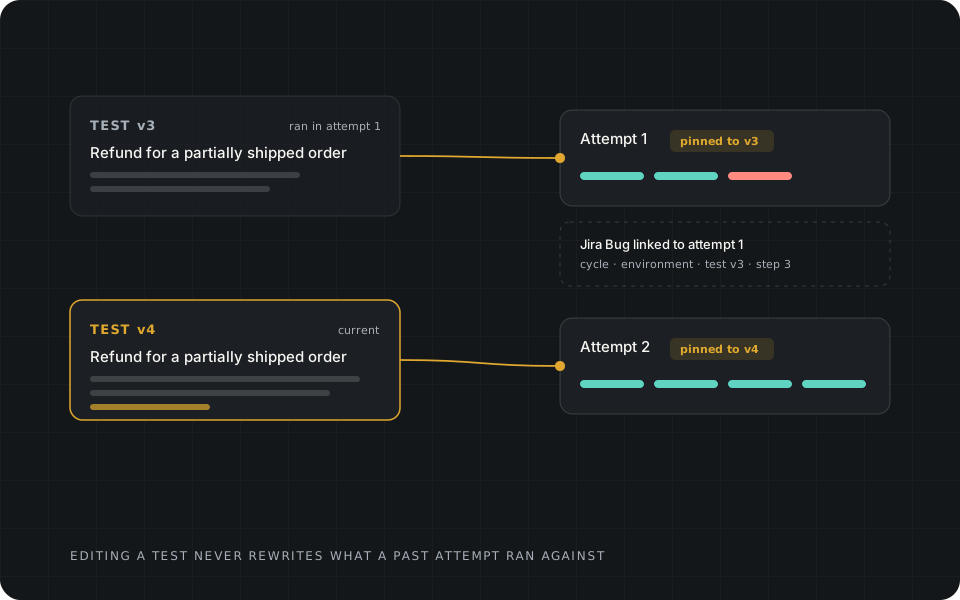
Attempt 1 stays pinned to test version 3 after the test becomes version 4; attempt 2 is pinned to version 4; a Jira bug stays linked to attempt 1.

What the daily workflow includes

Everything a Jira QA team does every day.

This is the native test management in the Marketplace version, included for teams that want it. TestWarden is publicly listed on Atlassian Marketplace. Keeping another test manager and adding The Warden above it is equally supported.

Shared tests
One canonical test in a shared Library, associated with many Jira projects, plus Project Tests where a project association must stay required. Folders, tags, owners, priority (Low to Critical), status (Draft, Ready), saved filters, bulk actions and cursor pagination for large libraries.
Structured steps
Action, test data and expected result per step. Paste up to 100 steps at once. Autosave, undo and redo, clone, version history, archive and restore.
Cycles
Test plans and cycles with release and environment context, up to 500 canonical tests each. Compose a cycle from a folder, saved view or tag. Step outcomes Passed, Failed, Blocked and Skipped, with keyboard shortcuts.
Version-pinned attempts
Each attempt snapshots the exact test version it ran and keeps an attempt history, with Run again. Later edits affect only future runs, so past results and coverage stay true.
Contextual defects
Create a Jira Bug from a failed or blocked step with the step text, expected and actual result, cycle, release, environment and attempt filled in and linked back.
Coverage
Pick a Jira issue to see linked tests and their latest attempt. Release coverage shows failing and blocked lists, per-cycle progress and untested requirements. No JQL and no dashboard setup.
Migration
Test cases from the Xray Test Case Importer CSV, a Zephyr Scale CSV or Generic CSV (including AIO Tests exports), with preview, explicit mapping, validation, resumable background import and reconciliation.
Export and permissions
CSV export of test data. Jira permissions map to Viewer, Tester, QA Manager and QA Admin on the server, and unclassified writes fail closed.
Evaluate it

A five-step trial that tests the claims.

Free for Jira sites with up to 10 users. Larger sites get a 30-day evaluation. Billing follows the whole Jira licensed-user quantity on the site, not only testers or active TestWarden users. Check your Jira user count before you start an evaluation. See pricing.

  1. 01Import a real export and compare the preview with the fidelity report.
  2. 02Author ten tests with pasted steps and share them across two Jira projects.
  3. 03Run a cycle, edit a test mid-cycle, and confirm the earlier attempt is unchanged.
  4. 04Fail a step and check the Jira Bug that arrives: step, expected and actual result, cycle, release, environment.
  5. 05Pick a requirement and a release and read the coverage without building a dashboard.

Optional migration

Test cases move. History stays where you keep it.

CSV migration brings test cases with mapped fields and structured steps. It does not bring historical executions, results or attachments, so retain or export those from your current tool before you retire it.

Compare what carries over for Xray, Zephyr Scale and AIO Tests, or read the Migration page for preview, idempotency and reconciliation details.

When you are ready for more

Add The Warden when automated proof matters.

The Warden is the verification authority included in the same app. CI and scanner reports in JUnit XML, SARIF or JSON are checked against a versioned contract for the exact build, and a deterministic policy decides. Recorded manual executions are not inputs to those decisions. Both paths are equal: use native testing, The Warden, or both.

  • Weak proof is named with a reason code and a next action, not a score.
  • A tool's green result is evidence, never CLEARED.
How The Warden decides

From the blog

Reading for QA leaders on Jira Cloud

All articles →
  • Test managementOctober 28, 20264 min read

    Audit-Ready Jira Test Evidence: Requirements, Test Versions, Runs, Defects and Release Decisions

    An audit asks you to reconstruct what was tested, on which version, with what result and who decided. Six linked records make that a lookup instead of an archaeology project.

  • Test managementOctober 6, 20265 min read

    Choosing test management for Jira Cloud: an evaluation checklist

    How to evaluate Xray, AIO Tests, Zephyr Scale, TestWarden or anything else: an interactive scorecard, a trial protocol and the questions that separate demos from daily use.

Now available on Atlassian Marketplace

Proof before progress.

TestWarden is listed on the Atlassian Marketplace for Jira Cloud. Keep your existing test-management and CI tools, and add The Warden's independent verification layer—or use TestWarden's built-in Jira test management. Visit the Marketplace to get started; we're here if you want guided setup or migration help.